


OptionStrat - Options Toolkit
4.3158.00 Reviews
App Specs
- Version
- 1.3.1
- Updated On
- License
- Free
- Downloads
- 100,000+
- Developer
- OptionStrat
- Categories
- Finance
- Platform
- Android
Screenshots
 Analysis by AppCompare
I often use finance apps in small pockets of time, but options research is not something I’d casually hand over to a family member or leave open on a shared screen. With OptionStrat - Options Toolkit, the most useful household scenario is one person doing the analysis and then explaining the idea to a partner or another adult. Its payoff visuals give you something concrete to discuss: what conditions might help a strategy, and where the risk sits. I’d treat it as a calculator and research aid, not as a shared account or a substitute for agreeing on how household money is managed.
Keep the analysis separate from the decision
On a shared phone or tablet, I’d make a clear boundary between exploring a hypothetical position and placing a real trade elsewhere. Building a strategy can make an idea feel more polished than it is; a chart is still a model based on inputs, not a promise about what the market will do. I’d use the app to ask “what if?” and take time to check the assumptions before acting. That distinction matters especially when several people contribute to the same budget, because the person who understands the chart should not automatically become the only decision-maker.
For a practical routine, I’d write down the underlying asset, intended strategy, and the assumptions I changed while testing it. Then I’d show the other person both the attractive outcome and the unfavorable one, rather than sharing only the result that supports my first instinct. This makes discussion more useful and reduces the chance that a confident-looking visual is mistaken for a low-risk recommendation. It also gives you a simple way to revisit the reasoning later without relying on memory.
What it can—and cannot—coordinate
The app is best understood as an individual toolkit, not a household planning hub. I wouldn’t assume that it synchronizes decisions between people, manages a shared portfolio, or provides a way to approve another person’s trades. If several adults are comparing ideas, agree on a simple process outside the app: who is researching, who checks the downside, and where the final decision is recorded. That modest step is more dependable than expecting a specialist options tool to coordinate family finances.
This also helps prevent a common mix-up: unusual options activity can be interesting to examine, but seeing a large trade does not tell you why it was made or whether it suits your circumstances. I’d use that information to form a question for further research, not as a signal to copy someone else. If you’re discussing an idea with a partner, focus on your own risk tolerance and time horizon rather than trying to infer another trader’s intentions from activity alone.
Age, trust, and learning boundaries
The app is rated for Everyone, but options trading is an adult financial activity with risks that a broad content rating does not explain. I’d be comfortable showing a curious older teen how a payoff diagram changes when assumptions change, as an educational exercise, while keeping account access, trading permissions, and real-money decisions with the responsible adult. The age label should not be read as a recommendation for children to trade or as evidence that the strategies are suitable for every user.
For a beginner of any age, the most trustworthy habit is to question the model. A profit-and-loss estimate can help clarify how a position may behave under selected conditions, but it cannot remove uncertainty or guarantee that a trade will work out as pictured. I’d start with simple examples, change one input at a time, and explain what the change does before exploring more complicated combinations. If someone cannot describe the downside in their own words, they are not ready to act on the displayed scenario.
Worth Reading Before You Choose

EA SPORTS FC Mobile 26 Is a Bigger Football Game, but It Takes Time

Flipboard Shows What News Apps Must Do Beyond the Feed

Switching to Android Auto Means Rethinking Your Driving Routine

Google Calendar Makes a Crowded Week Easier to Manage

Ludo King Makes the Most of the Minutes Between Plans

Baby Panda World Brings Quick Play to Modern Phones, but Its Game Library Feels Busy
Who will get the most from it
I see the strongest fit for someone who already knows at least the basics of calls, puts, strikes, and expirations, and wants to compare possible structures without doing every calculation by hand. It can also suit a learner who is willing to pause and look up unfamiliar terms rather than treating the app as a step-by-step course. If you only invest in ordinary shares or funds and have no interest in options, much of its specialized toolkit will be unnecessary; a basic portfolio or budgeting app would be a better match for that job.
It is also not my first pick for someone seeking a broker, automatic portfolio management, or a complete personal-finance dashboard. Its focus is narrower: helping users inspect options strategies, estimate outcomes, and look at market activity. Keeping that scope in mind makes the app easier to judge. It can support preparation, but it should not be confused with an execution venue or a comprehensive plan for household finances.
OptionStrat is a free finance app from OptionStrat, with in-app purchases ranging from $19.99 to $419.99 per item. It has a 4.3 average from around 1.4 thousand ratings, and has been installed over 100 thousand times. The app is rated Everyone, runs on Android 6.0 or later, and its current version is 1.2.58. I’d check which tools matter to my own workflow before paying for anything; the free starting point is useful for deciding whether this specialist approach fits, while the purchase range makes it sensible to understand the cost of any upgrade first.
Diving into the Features
The first thing that caught my attention was the app's clean and intuitive interface. Navigating through OptionStrat feels natural, even for those who aren't seasoned traders. The app offers a plethora of features designed to make options trading more accessible and less stressful.
Strategy Builder
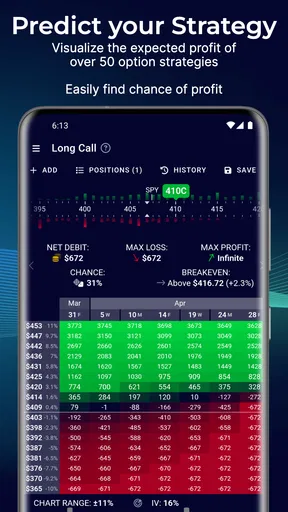
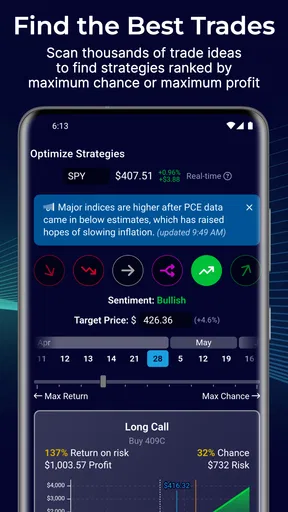
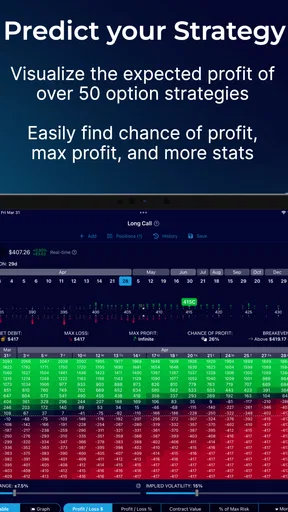
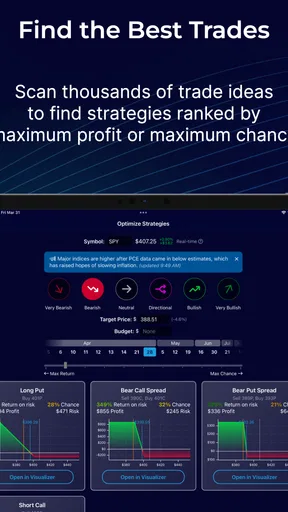
One of my favorite features is the Strategy Builder. This tool allows you to craft personalized options strategies with ease. You simply select your stock, and it provides a visual representation of various strategies. This visual approach helps in understanding potential outcomes without getting bogged down by technical jargon.
My practical tip is to use the builder as a comparison workspace rather than a strategy vending machine. Set up a position you already understand, then compare it with a nearby alternative and ask what changes in the payoff shape. A small adjustment to a leg can change where the position gains or loses, and seeing the diagrams side by side makes that trade-off easier to discuss than relying on a strategy name alone. I’d avoid building several complex combinations at once until I can explain the purpose of each leg.
Profit & Loss Calculator
The Profit & Loss Calculator is another gem. It lets you simulate different scenarios by adjusting parameters like strike price, expiration date, and implied volatility. I found this particularly useful for gauging the risk and reward of potential trades. The ability to see potential profits and losses in a clear, graphical format is incredibly helpful.
A useful way to learn from the calculator is to change just one assumption at a time. For example, keep the strategy intact and see how the picture shifts when implied volatility changes; then restore that input and examine a different expiration. This does not tell you which outcome will happen, but it shows which assumptions the idea depends on. If the apparent appeal disappears after a modest change, that is worth noticing before the position becomes real money. I would also distinguish the visual estimate from the actual price at which a trade can be opened or closed.
Market Insights
Staying informed is crucial in the trading world, and OptionStrat offers market insights that keep you updated with the latest trends. The app compiles data from various sources, giving you a comprehensive view of the market landscape. It's like having a personal analyst in your pocket!
I’d use those insights as a starting point for questions, not as a complete explanation of a market move. A busy-looking screen can encourage constant checking, but frequent updates are not automatically useful if they do not change your analysis. I find it more productive to decide what I’m trying to learn before opening the app: for instance, whether a strategy’s risk profile still fits a specific view. That keeps browsing purposeful instead of turning every movement into a reason to revise a plan.
Options Flow
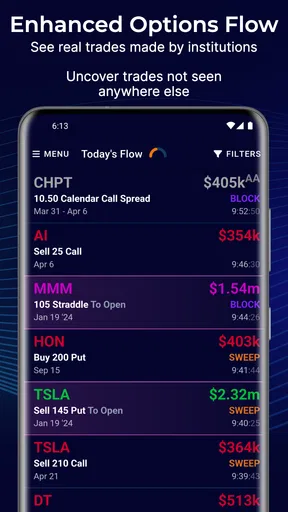
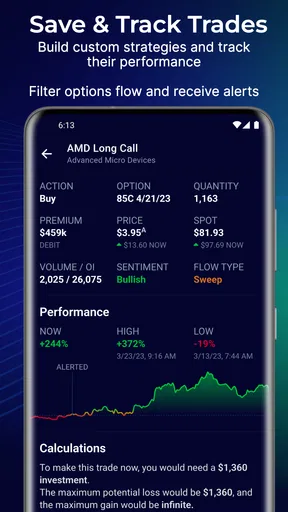
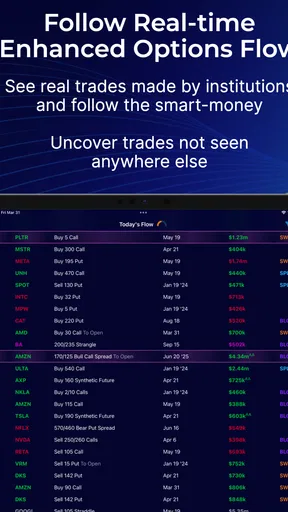
For those who want to dig deeper, the Options Flow feature provides real-time data on large options trades. This can be a powerful tool if you're looking to understand what the big players are doing. I found this feature fascinating, as it offers a peek into the strategies of more experienced traders.
The trade-off is that activity is easier to observe than to interpret. A large transaction does not, by itself, reveal the trader’s full position, motivation, or intended holding period. I’d avoid treating a single flow item as a buy or sell instruction. A more disciplined workflow is to notice an item, independently inspect the underlying and possible strategy, and then use the calculator to test whether the idea makes sense under different outcomes. If it does not fit your own plan, the activity can remain interesting without becoming an action.
Personal Experience and Takeaways
Using OptionStrat has been an eye-opener for me. Not only does it offer tools that simplify complex concepts, but it also empowers you to make informed decisions. I've found myself more confident in exploring new strategies and understanding the potential risks involved.
My confidence comes from being able to examine a position before committing, not from assuming the app can predict the market. Compared with a spreadsheet, the visual strategy approach is easier for quickly understanding how a payoff may change across outcomes; a spreadsheet can still be preferable if you want a custom model or a broader record of your finances. Compared with a broker’s built-in trade ticket, this kind of toolkit is more useful for exploring structures, while the broker remains the place to review execution details. I would use them for different jobs rather than expect one to replace the other.
A realistic everyday use would be checking an idea during a quiet moment before discussing it with a partner that evening. I might sketch the position, test a less favorable assumption, and note what I still need to verify. When we talk, I can explain the possible loss as clearly as the hoped-for gain. If the idea cannot be described simply, or if the downside would strain our shared budget, that is a good reason to stop rather than search for a more flattering chart.
On a lighter note, the app's ease of use means I'm spending less time scratching my head and more time actually enjoying the process of trading. It's like having a mentor guiding you through each step, minus the intimidating jargon.
Room for Improvement?
While OptionStrat is impressive, no app is without its quirks. Occasionally, I found myself wishing for a more detailed tutorial section for complete beginners. While the app is intuitive, a few extra pointers here and there could make a world of difference for those just starting out.
That learning curve is the main reason I would not recommend it as a first and only resource for someone who has never encountered options. The visuals can make strategies approachable, but approachability is not the same as a full course in pricing, assignment, liquidity, or the ways real execution can differ from a modeled payoff. I’d pair the app with careful study and, where appropriate, professional financial guidance. Users who want plain-language lessons before touching a strategy tool may prefer to learn elsewhere first, then return when they have specific questions to test.
A sensible place in a household routine
For shared-device use, I’d treat the app as a research screen rather than a family account. Before handing a phone to someone else, close or leave the analysis in a state that does not imply permission to act. If multiple adults use the same device, agree whose assumptions are being modeled and avoid presenting one person’s draft as a household decision. These are simple habits, but they help keep the tool’s role clear without expecting it to provide controls it is not designed to offer.
My household verdict is that it can make a useful conversation aid for adults who already have a reason to study options, especially when a payoff picture helps them discuss risk in concrete terms. It is not a budgeting app, a shared investing plan, or an ideal substitute for beginner education. If everyone involved understands those limits, it can support a more thoughtful discussion; if the household needs basic money management or a simple long-term investing tool, I’d choose something built for that instead.
Final Thoughts
In conclusion, OptionStrat - Options Toolkit is a must-have for anyone interested in options trading, whether you're a newbie or a seasoned trader. It offers a perfect blend of functionality, user-friendliness, and insightful data that can elevate your trading game.
So, if you're ready to dive into the world of options trading with a little more confidence, give OptionStrat a try. Who knows? It might just become your new favorite trading companion!
Pros
- User-friendly interface for beginners.
- Comprehensive option strategy analysis.
- Real-time market data integration.
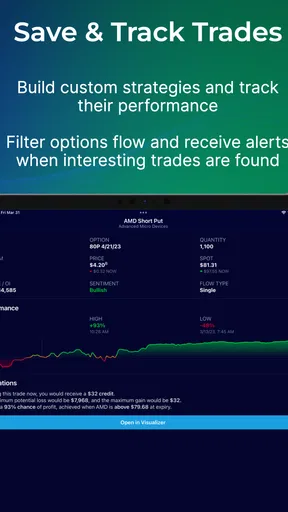
- Customizable alerts for price changes.
- Detailed profit and loss visuals.
Cons
- Limited features in free version.
- Occasional app crashes reported.
- Requires internet for full functionality.
- Frequent ads in free version.
- Learning curve for complex strategies.
FAQs for OptionStrat - Options Toolkit
What is OptionStrat - Options Toolkit used for?
OptionStrat - Options Toolkit is designed for options traders seeking to enhance their trading strategies. The app provides real-time data, strategy guides, and profit/loss calculators, enabling users to visualize potential outcomes and optimize their trades. It's an invaluable tool for both beginners and seasoned traders looking to maximize their investment returns.
Is OptionStrat suitable for beginners in options trading?
Yes, OptionStrat is beginner-friendly. It offers intuitive features and educational resources, making it easy for newcomers to understand options trading. The app includes strategy guides and visual tools to help users learn the basics and gradually build their trading skills, making it an excellent starting point for anyone new to options.
Does OptionStrat offer real-time data and alerts?
OptionStrat provides real-time market data and alerts, ensuring users stay informed of market movements. This feature allows traders to react promptly to changes and make informed decisions. The app's ability to deliver timely updates is crucial for executing successful trades and staying ahead in the fast-paced world of options trading.
Can I customize my trading strategies in OptionStrat?
Yes, OptionStrat allows users to customize their trading strategies. The app offers a range of tools to modify and test different strategies, enabling users to tailor their approach based on individual preferences and market conditions. This flexibility is key for traders who wish to experiment and refine their trading plans.
Is there a cost associated with using OptionStrat?
OptionStrat offers both free and premium subscription options. The free version provides basic features suitable for casual traders, while the premium subscription unlocks advanced tools and data for more serious investors. Users can choose based on their trading needs and budget, ensuring access to the right level of functionality.


